


Most WordPress advice starts with the wrong prescription: install Yoast or Rank Math, generate a sitemap, and call the technical SEO work finished. That setup can help manage metadata, but it won’t repair an orphaned service page, remove conflicting scripts, fix a slow server response, or stop a theme template from producing indexable duplicates.
Technical SEO for WordPress is an operating discipline. It connects the WordPress template hierarchy, hosting layer, plugin stack, crawl paths, rendered HTML, and real-user performance data to commercial outcomes such as calls, bookings, and qualified enquiries. The right question isn’t “Which plugin should I install?” It’s “Which template or system is preventing valuable pages from being crawled, understood, rendered, or used?”
Table of Contents
- Why Installing an SEO Plugin Is Not Technical SEO
- The Scale of WordPress and Why Technical Decisions Matter
- Core Web Vitals as a Field-Data Problem
- Site Architecture and Crawlability Fundamentals
- Choosing the Right Plugins Without Creating Bloat
- Schema Markup and Machine Readability for Modern Search
- Building a Technical SEO Governance Framework
Why Installing an SEO Plugin Is Not Technical SEO
An SEO plugin is useful, but it occupies only one part of the technical SEO system. It can help control title tags, meta descriptions, XML sitemaps, canonical signals, redirects, and structured data. It can’t independently determine whether your server delivers cached HTML quickly, whether a page builder loads unnecessary JavaScript, or whether your most important location page has internal links pointing to it.
That distinction matters during audits. A WordPress site may show green plugin indicators while its navigation hides important pages, its tag archives create thin URL variations, and its contact form plugin loads scripts across every template. The dashboard reports configuration. Search engines evaluate the HTML, links, responses, rendering, and indexable URL set they receive.

What an audit needs to uncover
Technical SEO begins with evidence from a crawl and production behaviour, not plugin status lights. I look at:
- Discoverability: Can Googlebot reach important service, product, and location URLs through ordinary internal links?
- Indexation: Are search results, attachment pages, filtered archives, and duplicate paths being exposed unnecessarily?
- Rendering: Does the initial HTML contain the main content, links, headings, and calls to action?
- Performance: Do real users experience slow content rendering, layout movement, or delayed interactions?
- Conversion templates: Do the pages receiving search demand load the form, phone link, map, and trust elements without unnecessary client-side work?
WordPress generates pages through templates, hooks, taxonomies, widgets, and plugins. A change to one shared template can affect an entire class of URLs. That’s why a homepage score alone tells you very little about a local business site whose revenue depends on service pages and booking flows.
Practical rule: Treat every plugin as code running in production, not as a harmless checkbox.
For a broader audit process, Refact’s SEO audit checklist is a useful reference, especially when documenting crawl, indexation, and implementation issues. Businesses also need to separate technical remediation from vendor selection, which is covered in this guide to choosing an SEO company for small businesses.
The Scale of WordPress and Why Technical Decisions Matter
WordPress is not a niche publishing system. W3Techs data reported by Search Engine Journal states that, as of late August 2026, WordPress is used on 40.7% of all websites and 58.9% of websites with a known content management system. That reach makes WordPress technical patterns consequential well beyond individual sites.
The platform launched in 2003 and grew from a blogging tool into a general-purpose CMS, as documented in the same WordPress market-share analysis. Its mature ecosystem gives agencies and business owners broad control over permalinks, metadata, sitemaps, canonicalization, structured data, themes, and performance layers. That flexibility is valuable, but every additional layer can create another failure point.
A small local site may have only a modest number of important pages, yet its templates still determine how Google discovers and renders those pages. A category archive, author archive, media URL, or search-results page can become crawlable because a theme or plugin links to it. The issue isn’t that WordPress creates poor SEO by default. The issue is that its defaults and extensions require deliberate governance.
Where WordPress technical waste comes from
Crawl waste usually starts with URL generation and internal linking. A tag archive with little unique content can be linked from posts, while a high-value service page remains several navigation steps away or receives no contextual links at all. Pagination, filters, feeds, and attachment URLs can multiply the crawlable surface without improving customer acquisition.
The table below is a prioritization model, not a claim that every site experiences the same level of waste. The exact impact depends on the templates, links, directives, and URL inventory found during a crawl.
| Technical issue | Crawl budget waste | Indexation risk | Fix complexity |
|---|---|---|---|
| Thin tag and taxonomy archives | Can divert crawling from commercial URLs | Unhelpful archive pages may enter the index | Low to moderate |
| Attachment and media pages | Can create low-value URL variants | Duplicate or near-empty pages may be indexed | Low |
| Orphaned service or location pages | Crawlers may discover pages slowly or not through site navigation | Valuable pages can remain absent or poorly understood | Moderate |
| Plugin-generated filtered URLs | Can expand the crawlable URL set | Similar versions can compete with the preferred page | Moderate to high |
| Conflicting redirects and canonicals | Can weaken URL consolidation signals | Search engines may select an unintended URL | Moderate |
Local businesses are especially exposed because a “set and forget” site often receives occasional plugin updates, new landing pages, embedded reviews, chat tools, and form changes without a technical review. A platform with broad market coverage magnifies the importance of getting those operational choices right.
Core Web Vitals as a Field-Data Problem
A passing Lighthouse result isn’t the same thing as a healthy WordPress template. Google defines Core Web Vitals as metrics for real-world user experience and connects them to reporting in Google’s Web Vitals documentation, including Search Console data based on field measurements from actual users.
The practical thresholds are:
- LCP, or Largest Contentful Paint: 2.5 seconds or less for a good result.
- CLS, or Cumulative Layout Shift: 0.1 or less.
- INP, or Interaction to Next Paint: generally under 200 milliseconds for good responsiveness in newer guidance.
These thresholds and the change from FID to INP are documented in WordPress technical SEO guidance on Core Web Vitals. They’re useful budgets, but the diagnostic work starts with identifying which template and component causes the problem.
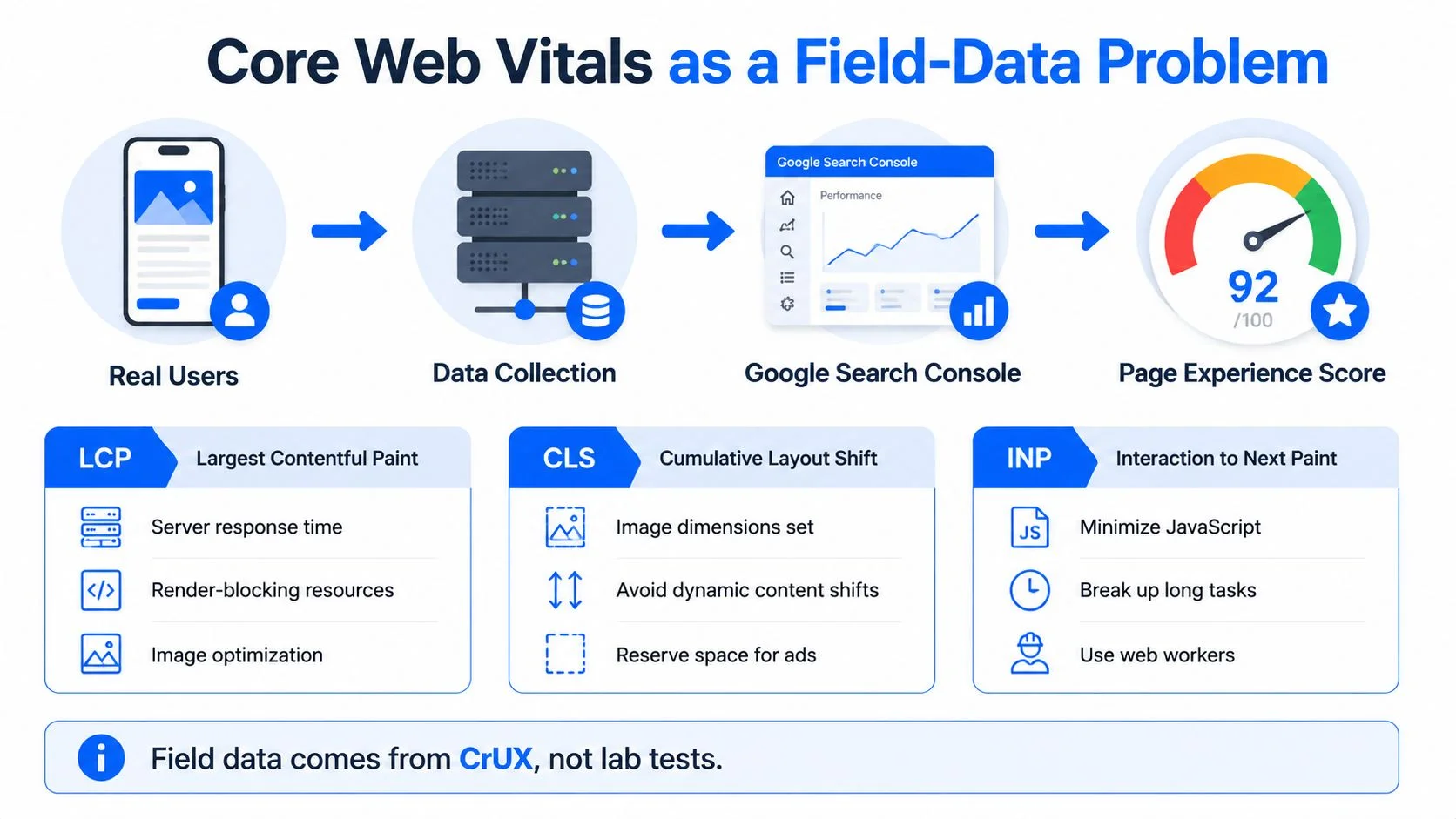
Match each metric to a WordPress cause
LCP problems often point to the first meaningful content arriving too late. A page builder may load a large hero image through a background-image rule, while the server waits on uncached PHP work or database queries. Start by checking cached HTML delivery, server response time, image dimensions, responsive image attributes, and render-blocking CSS before adding another optimization plugin.
CLS problems usually appear when the browser doesn’t know the final dimensions of an element. Reserve space for images, review widgets, banners, and embeds. Load fonts deliberately, use appropriate font-display behaviour, and inspect whether consent tools or personalization components inject content after the initial layout.
INP problems reveal delayed interaction. Form builders, chat widgets, sliders, analytics tags, and page-builder bundles can keep the main thread busy after the page appears. Deferring nonessential scripts, removing unused interactions, and replacing a heavy component often works better than applying another blanket minification setting.
Use field data by template
A practical workflow uses CrUX and PageSpeed Insights field segments with WordPress-specific validation alongside Search Console. Group URLs by template, device context, and business purpose. A homepage, service page, blog post, and booking page shouldn’t share one undifferentiated performance target.
- Start with revenue pages. Identify the URLs that generate calls, form completions, bookings, or high-intent visits.
- Compare field and lab evidence. Lab testing helps isolate a change. Field data tells you whether real users experience the improvement.
- Reproduce production conditions. Preview environments should use the same CDN, redirects, compression, caching, consent logic, and personalization behaviour as live pages.
- Re-test after changes. Theme updates, plugin installations, new embeds, and content changes can alter shared templates.
A monitoring approach such as PageSpeed Plus WordPress monitoring guidance can support ongoing checks, but the tool won’t replace ownership of the template and plugin decisions. Responsive design also needs to be tested as an implementation system, not assumed from a flexible layout. That principle is central to responsive web design services that support business growth.
Site Architecture and Crawlability Fundamentals
WordPress makes publishing easy, which means it also makes URL creation easy. A site can accumulate categories, tags, author archives, feeds, attachment pages, pagination, and filtered views without anyone deciding whether those URLs deserve search visibility.
The right architecture begins with commercial intent. A local contractor may need a clear hierarchy from the homepage to service pages and then to location-specific pages. A publisher may need category and article relationships. An online shop needs product, category, and faceted navigation rules. The CMS should support those relationships rather than expose every possible archive.

Build links around business value
Internal linking is a template-level operation. The navigation, breadcrumbs, footer, related-content modules, and body copy should consistently reinforce the pages that matter commercially.
- Primary navigation: Link directly to core services and meaningful location hubs.
- Breadcrumbs: Show the parent-child relationship and support a clear path back to the relevant service or category.
- Contextual links: Connect supporting articles to the service page they help qualify, using descriptive anchor text.
- Related content: Don’t let an automated “related posts” widget produce random links. Restrict it to relevant taxonomy or manually curated relationships.
- Orphan checks: Crawl the site and find important pages with no incoming internal links.
A page shouldn’t need to rely on its XML sitemap as its only discovery mechanism. Sitemaps help search engines find important URLs, but internal links communicate priority and context.
Choose between canonical, noindex, and exclusion
Use a self-referencing canonical on the preferred version of a page when that URL should remain indexable. Use a canonical to consolidate substantially similar versions when the alternate URL has a clear preferred counterpart. Use noindex for pages that users may need but that shouldn’t appear in search, such as internal search results or certain thin utility pages.
Robots.txt is not a substitute for noindex. If a crawler can’t access a page, it may not see the directive. Blocking important CSS or JavaScript can also interfere with rendering, so rules need to be tested rather than copied from a template.
Keep the sitemap honest
Include canonical, indexable, valuable URLs. Exclude low-value post types, unwanted archives, and URLs that return errors or redirect elsewhere. WordPress SEO plugins can generate sitemap files, but an owner still needs to inspect the output in Search Console and compare it with crawl data.
Before changing permalink structures, record the existing URLs, stage the redirect rules, and inspect 404s after deployment. A redesign checklist such as this step-by-step website redesign checklist is useful because URL changes often create more SEO risk than the visual redesign itself.
Choosing the Right Plugins Without Creating Bloat
The best WordPress SEO stack is rarely the one with the most features. It’s the stack with clear ownership. One system should control metadata, one should generate the sitemap, one should manage schema output where appropriate, and redirects should have a documented home.
The comparison below describes common positioning and trade-offs. Actual behaviour varies by configuration, extensions, theme integrations, and custom code, so verify the rendered HTML rather than relying on the plugin name.
| Plugin | Schema output | Sitemap control | Redirect manager | Known bloat risks | Best for |
|---|---|---|---|---|---|
| Yoast SEO | Broad connected schema framework | Strong core controls | Available in paid configurations | Overlap with separate schema, redirect, or social plugins | Teams wanting a mature guided workflow |
| Rank Math | Broad schema and SEO feature set | Extensive controls | Built into supported configurations | Feature overlap and unused modules can increase complexity | Users wanting many controls in one system |
| SEOPress | Metadata, schema, and technical controls | Flexible sitemap management | Available in supported configurations | Redundant modules or integrations can duplicate output | Teams preferring a configurable interface |
| The SEO Framework | Lightweight, automation-focused output | Core sitemap support | More limited depending on setup | Additional plugins may be needed for advanced workflows | Sites prioritizing a lean baseline |
Audit features, not brand labels
Export the active plugin list and assign each feature to an owner. Check the source HTML for duplicate title tags, Open Graph properties, JSON-LD graphs, canonical tags, and rewrite rules. Then deactivate unused modules in staging and compare crawl output, server response, and interaction behaviour.
Caching tools also need a single strategy. A page-cache plugin, host cache, CDN, image optimizer, script manager, and minification layer can each alter headers or asset delivery. Combining them without testing can make debugging harder and produce inconsistent results across logged-in users, mobile devices, and cache states.
Remove overlap before adding optimization. A smaller stack that you understand beats a larger stack that hides responsibility.
Don’t judge a plugin by its installation count or settings page. Judge it by the output it adds, the requests it creates, the database work it triggers, and the value it provides to your actual templates.
Schema Markup and Machine Readability for Modern Search
Structured data helps search systems interpret entities and relationships, but it doesn’t make unsupported claims true. A service page should describe a real service. A local business entity should match the business information visible on the site. An FAQ block should contain questions and answers that users can read.
For local and service businesses, the most useful schema often includes LocalBusiness, Organization, Service, BreadcrumbList, and, where applicable, FAQPage or review-related markup. The implementation should connect these types rather than output disconnected fragments from several plugins.

Make the markup agree with the page
Common failures include a service page claiming an aggregate rating that isn’t visible, an organization name that changes between templates, and FAQ schema attached to generic copy without visible question-and-answer content. Search engines may ignore markup that doesn’t accurately represent the page.
Use a controlled entity model:
- Business identity: Keep the organization name, logo, URL, contact details, and service area consistent.
- Service meaning: Describe the actual service delivered on that URL, rather than attaching a generic business type to every page.
- Breadcrumb path: Match the visible hierarchy and the URL structure.
- Reviews: Mark up only reviews and ratings that meet the relevant requirements and appear visibly on the page.
- FAQs: Add the markup only when the questions and answers are present and useful to visitors.
Validate the rendered page with Google’s Rich Results Test and the Schema Markup Validator. Check both syntax and meaning. A technically valid graph can still be strategically wrong if it describes the wrong entity or duplicates output from another system.
Prepare content for machine interpretation
AI-assisted discovery increases the value of clear, crawlable HTML and consistent entity references. It doesn’t justify stuffing pages with schema or writing FAQ blocks solely to attract a surface you can’t control. Systems that retrieve and summarize content still need accessible text, unambiguous headings, useful internal links, and reliable business facts.
The practical debate around FAQ markup and AI visibility is addressed in GetIntel’s analysis of FAQ schema and AI citations. For teams working beyond traditional rankings, generative engine optimization services provide a useful way to frame machine readability alongside conventional technical SEO.
Building a Technical SEO Governance Framework
WordPress technical SEO degrades when publishing, development, and marketing operate without shared controls. A new plugin can alter every template. A redesign can change canonical URLs. A form or chat tool can add JavaScript sitewide. If nobody records the change, the team can’t reliably connect a traffic or lead-quality change to its cause.
Governance doesn’t need enterprise bureaucracy. It needs named owners, staging parity, and a repeatable release check.
Assign responsibility before problems appear
Create a lightweight approval path:
- Plugin owner: Documents the business need, affected templates, scripts, schema, and settings.
- Developer or technical reviewer: Tests output, redirects, caching, accessibility, and performance in staging.
- SEO owner: Checks crawlability, indexation, canonicalization, sitemap inclusion, and internal links.
- Marketing owner: Confirms that forms, phone tracking, booking paths, and analytics still work.
- Business owner: Decides whether the expected commercial value justifies the technical cost.
Every release should have a change note. Record the previous state, the change, the affected URL types, and the validation result. The point isn’t paperwork. It’s making technical decisions reversible and measurable.
Test the templates that matter
A production-identical preview should use the same theme build, plugin configuration, CDN behaviour, redirects, compression, caching, consent tooling, and personalization rules as the live site. Crawl representative URLs from each template, not just the homepage.
Monitor:
- Search Console: Indexing, crawl coverage, Core Web Vitals, and page-level inspection.
- Scheduled crawls: Orphan pages, broken links, redirect chains, canonical conflicts, and unexpected indexable URLs.
- Performance tests: Field data by template plus controlled tests after releases.
- Conversion tracking: Calls, form submissions, bookings, and qualified lead events.
- Uptime and error monitoring: Availability, server errors, and failed user journeys.
A practical reference for documenting this work is the technical SEO checklist for high-performing websites. Review the framework after major launches and on a recurring audit schedule, but prioritize issues by commercial impact rather than by the number of warnings in a tool.
For WordPress businesses that need implementation support, Queen City Digital offers technical SEO and WordPress development focused on site speed, internal linking, structured data, clean URL architecture, and conversion tracking. Visit Queen City Digital to discuss an audit and a prioritized plan for improving the templates that drive your calls, bookings, and qualified leads.


